Free voice chat app for gamers
On Zpod you talk with friends in low-latency voice rooms. Push to talk works while your game is full screen, noise suppression cleans up keyboard and fan noise, and you can whisper to one person in the room so only they hear you. All free.
Not on Windows? Open Zpod in your browser — nothing to install.
- 1080p 60 FPS, no Nitro
- No VPN needed
- Viewers install nothing
- No ads, no subscription
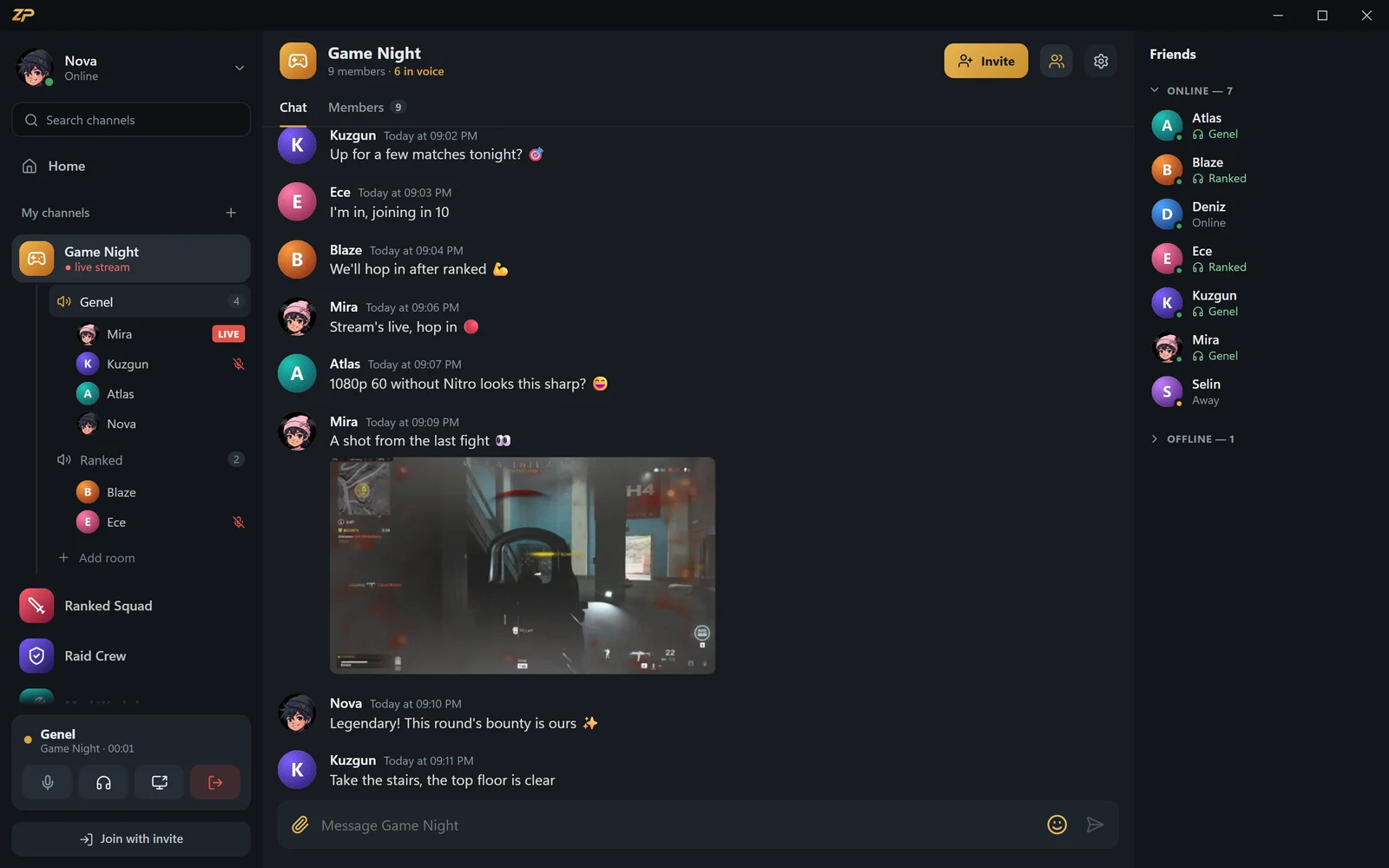
Voice rooms: click and talk
Open as many voice rooms as you like in your channel; clicking one is all it takes to join. A ring lights up around whoever is speaking, and muted mics and deafened headphones show right in the room.
Your friends list shows which room everyone is in, so you can hop straight over. Channel owners and admins can drag someone into a room or remove them.
- Unlimited voice rooms, one-click join
- Speaking ring, mic and headphone indicators
- See which room your friends are in
- Admins pull people into rooms or remove them
Talk freely while you play
Choose voice activity or push to talk. Your push-to-talk key can be on the keyboard or a mouse side button, and it works — along with the mute and deafen shortcuts — while your game is full screen.
When you're in a voice room, the in-game overlay shows only who's talking and who's muted, in a corner of your game. Nothing is injected into the game; the overlay is a separate window on top, and clicks go through to the game.
- Push to talk: keyboard or mouse side button
- Shortcuts that work in full-screen games
- In-game overlay that injects nothing
- Closes to the tray; you choose your notifications
Clean audio: noise and echo suppression
Noise suppression cuts background sounds like keyboards and fans. Strong mode runs the RNNoise neural network right on your device; your voice isn't sent anywhere to be cleaned.
Echo cancellation stops sound from your speakers looping back into your mic. Someone too loud? Right-click them to turn them down or mute them just for you.
- Strong RNNoise noise suppression, on your device
- Echo cancellation
- Mic test and input level meter
- Per-person volume and mute
Whispers and soundboard
Double-click someone in the voice room: a whisper panel opens, and while you hold the key your voice goes only to them. Text whispers aren't stored on the server — only the two of you see them.
Bind sounds to shortcuts on the soundboard; press one and everyone in the room hears it. You can even route your mic and soundboard into your game's own voice chat as a virtual mic.
- Voice and text whispers
- Text whispers aren't stored on the server
- Soundboard with shortcuts
- Virtual mic output for in-game voice chat
Start voice chat in 3 steps
Create a free account
Join zibidigames.com or sign in with Steam.
Open Zpod
Download the Windows app or open zpod.zibidigames.com/app in your browser.
Click a voice room
You'll be asked for mic permission the first time; then start talking.
Voice chat FAQ
Is voice chat on Zpod free?
Yes. Every feature, voice rooms, noise suppression and whispers included, is free; there's no paid tier.
Does push to talk work in games?
Yes. Shortcuts work system-wide, even while your game is full screen. Set the key in Settings > Audio; mouse side buttons work too.
Will the in-game overlay trigger anti-cheat?
The overlay injects nothing into the game and doesn't touch its memory, files or rendering. It's a separate window on top of the game, shown when the game runs in borderless or windowed mode.
How do I turn on noise suppression?
You'll find noise and echo suppression in Settings > Audio. Strong mode is RNNoise and runs on your device; if your voice cuts out, turn strong mode off.
Can I voice chat in the browser?
Yes, use zpod.zibidigames.com/app without installing anything. System-wide shortcuts and the in-game overlay are in the Windows app.
More Zpod features


Ready for game night?
Zpod is free. Download it or open it in your browser now — your friends are one invite code away.
No account yet? Sign up